 Free Live RadarADSB Tracker LiveReal-time ADS-B flight data from open-source receivers. Track aircraft anywhere in the world without subscription paywalls.Download for iPhoneGet it on Google Play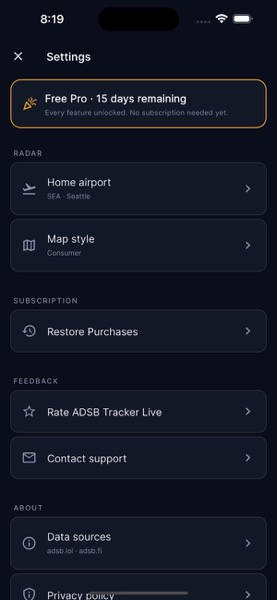
The phenomenon of being able to point your phone at an airliner overhead and immediately know its tail number, origin, destination, and altitude wasn’t possible a decade ago. Today it’s a one-tap operation thanks to ADS-B Out — the requirement that since 2020 most aircraft operating in controlled US airspace broadcast their position, altitude, and identification continuously. A network of community-operated receivers captures those broadcasts and feeds them to public APIs. The mobile apps consuming those APIs have proliferated. Each takes a different approach to data, presentation, and pricing.
For pilots, aviation enthusiasts, and the growing population of people who simply want to know what they’re looking at when an interesting aircraft passes overhead, this is the era of free or near-free live flight tracking. After several months of using the available options in serious operational and recreational contexts, here’s the field assessment.
What ADS-B Out Actually Broadcasts
ADS-B Out is a transponder system that broadcasts:
- Aircraft identification (registration / “tail number” and ICAO 24-bit address)
- Position (GPS latitude/longitude)
- Altitude (barometric pressure altitude, occasionally GPS altitude)
- Velocity (ground speed and track)
- Vertical rate (climb/descent)
- Squawk code (transponder code assigned by ATC)
- Aircraft category (light, medium, heavy, rotorcraft, etc.)
This data refreshes once or twice per second from aircraft that have ADS-B Out installed. Most US commercial aircraft, most US general aviation aircraft post-2020, and most foreign aircraft over the US do.
What ADS-B Out does NOT broadcast: flight plan information, origin, destination, passenger count, fuel state, or anything proprietary. The flight tracking apps you use derive origin/destination by combining the live ADS-B data with flight schedule databases.
The Receiver Network That Powers Public Tracking
ADS-B receivers are inexpensive — a $20 USB dongle plus a Raspberry Pi creates a complete receiver capable of feeding data to public networks. The major networks:
- ADSBexchange.com — community-driven, no filtering of military or sensitive flights, raw data API access
- adsb.fi — European-led network, open data, similar policy to ADSBexchange
- adsb.lol — newer, open data network with community focus
- Flightradar24 and FlightAware — commercial networks with their own receivers and proprietary data refinement
The commercial networks (Flightradar24, FlightAware) filter certain flights at government request — typically military aircraft, sensitive law enforcement flights, and some VIP movements. The community networks (ADSBexchange, adsb.fi, adsb.lol) generally do not filter, showing all aircraft they receive data for.
This policy difference is the main reason a serious aviation enthusiast or researcher might prefer one network over another. For routine commercial flight tracking, the commercial networks have better data refinement and flight-schedule integration. For unfiltered military/sensitive tracking, the community networks are the only option.
What the Mobile Apps Actually Compare
Several apps in this space, each with tradeoffs:
ADSB Tracker Live — pulls from adsb.lol and adsb.fi. Free with no subscription paywall. Shows raw ADS-B data without commercial filtering. Clean interface, fast refresh. Best for pilots and aviation enthusiasts who want unfiltered data without paying.
Flightradar24 — commercial leader, polished interface, flight-schedule integration. Free tier shows a subset of flights and has ads; paid tier ($9.99/month or $39.99/year) unlocks full features. Filters sensitive flights.
FlightAware — focused on US flight tracking, professional pilot features, flight plan integration. Free for basic use, paid for advanced features. Also filters sensitive flights.
OpenADSB — open-source web tracker, no mobile app per se but mobile-friendly web interface. Free, community-data driven.
RadarBox — commercial app with similar feature set to Flightradar24. Free tier and paid tiers.
What ADSB Tracker Live Does Well
For the field assessment, I’ve been using ADSB Tracker Live alongside Flightradar24 for the last 60 days. The pattern:
Raw data access. Aircraft that are deliberately not filtered show up. Military training flights, the occasional special-mission aircraft, certain government aircraft that Flightradar24 omits. For aviation enthusiasts interested in operational variety, this matters.
No subscription friction. Free, no signup, no premium tier blocking common features. You can tap an aircraft and see its data immediately. Flightradar24’s free tier has gotten more limited over time, with more features paywalled.
Fast refresh. Updates from the open ADS-B networks are typically 1-2 second refresh, comparable to commercial trackers. Some lag on very high-traffic regions where data ingestion is bottlenecked, but generally responsive.
Lightweight UI. Doesn’t try to overlay weather, NOTAMs, or other features that some flight trackers cram into the same view. Just shows where aircraft are and what they are. Useful when you specifically want to see aircraft positions cleanly.
Where Commercial Trackers Win
Flightradar24 and FlightAware aren’t bad — they’re often better for specific use cases:
Flight schedule integration. Tap a commercial airliner and see scheduled departure/arrival, gate information, on-time history. The community-data apps generally show only what ADS-B broadcasts.
Historical playback. Commercial apps maintain detailed flight history for replay. Useful for incident analysis, route research, or learning about specific flights.
Cell-tower assisted positioning. When ADS-B coverage is weak (over ocean, certain remote areas), commercial trackers blend ADS-B with MLAT (multilateration) and other techniques for fuller coverage. Community-data apps sometimes have coverage gaps in these areas.
Airline operations features. Detailed aircraft databases, registration histories, fleet operator information. Aviation researchers and AvGeek users often want this depth.
LIVE FLIGHT TRACKERADSB Tracker LiveTry live ADS-B tracking without subscription frictionDownload for iPhoneGet it on Google PlayUse Cases Worth the Install
Pilots and aviation professionals:
- Pre-flight situational awareness. Checking traffic patterns around your departure airport before launch. Useful for general aviation pilots flying into busy airspace.
- Post-flight verification. Confirming your filed flight plan matches what was actually flown. Useful for training pilots and IFR currency tracking.
- Operations interest. Watching how busy ATC sectors actually look from above. Real-world view of the traffic flows you read about in academic terms.
Aviation enthusiasts (AvGeeks):
- Aircraft spotting. Knowing what aircraft will be visible from your spotting location. Useful at airshows, fly-ins, and major airports.
- Rare or unusual aircraft. Tracking specific aircraft of interest — vintage warbirds, prototype aircraft, government aircraft, etc.
- Route research. Understanding traffic patterns, common routes, popular destinations.
General curiosity:
- “What’s that overhead?” The single most common reason people install flight tracker apps. Point phone at sky, see what’s there.
- Family tracking flights. Following a relative’s commercial flight from departure to arrival.
- Aviation events. Watching displays at airshows from a distance with full context of what’s flying.
The Privacy Question
ADS-B data is publicly broadcast — there’s no privacy expectation on the data itself. But individual aircraft owners (especially business jet and general aviation owners) have raised concerns about ease of tracking.
The FAA’s Limiting Aircraft Data Displayed (LADD) program allows aircraft owners to opt out of commercial tracker display. Most commercial trackers honor LADD. Community-data trackers vary in their policy.
For aviation users who value privacy — celebrity-owned aircraft, business jets, certain corporate operations — this is a meaningful consideration. For the tracking apps, this is a community policy decision, not a technical one.
How ADS-B Coverage Works (And Where It Doesn’t)
ADS-B requires line-of-sight reception from ground-based receivers. Coverage is excellent over land in developed countries because of dense receiver networks. Coverage is sparser:
- Over open ocean (no land-based receivers within range)
- Over remote regions (Alaska, parts of Canada, Australian Outback)
- At low altitudes in mountainous terrain (terrain blocks line-of-sight)
- Over conflict zones where receiver operators may not be active
For continental US flights, coverage is essentially complete from cruise altitude. For oceanic flights, expect gaps; the commercial trackers use satellite ADS-B (Aireon network) to fill these. Most free apps don’t have satellite ADS-B data.
What’s Coming in ADS-B Land
A few trends worth noting:
Universal ADS-B Out equipage — most aircraft that operate in controlled US airspace are now ADS-B Out equipped. The few exceptions are mostly antique aircraft and certain helicopters. By 2027, expect essentially universal coverage.
Satellite ADS-B (Aireon) — covers oceanic regions previously without ADS-B reception. Currently behind paywalls in most commercial trackers; expect this to gradually become available in community data.
Ground-based ATC integration — ATC facilities increasingly use ADS-B as their primary surveillance source, replacing or supplementing radar. The data we see on tracking apps is the same data controllers use.
For Pilots — Adding ADS-B to Your Cockpit Resources
Many pilots use ADS-B tracking apps on their phones as a supplementary tool alongside ForeFlight, Garmin Pilot, or their installed aircraft systems. The use case is operational awareness — what’s around me, what traffic is doing in my vicinity, what arrival/departure flows look like at my destination.
For general aviation pilots, a free unfiltered ADS-B tracker can be a more informative source than the commercial alternative for understanding actual traffic patterns at your destination airport. Knowing that 12 aircraft are inbound for the same runway at the same time changes your planning decisions.
For training pilots, post-flight review using ADS-B data shows your actual track flown vs your planned route. Useful for self-evaluation of GPS direct accuracy, holding pattern entry, and approach geometry.
The Honest Bottom Line
For most aviation enthusiasts and casual aircraft watchers, a free open-source ADS-B tracker covers the use case completely. The commercial trackers add polish, flight schedule integration, and certain advanced features — worth the subscription if you use those features regularly.
For pilots, especially general aviation pilots, having both a community-data tracker and a commercial tracker installed gives you both unfiltered data access and flight schedule context. The combined cost is the subscription to one commercial tracker; the community tracker is free.
For privacy-conscious aircraft owners, LADD enrollment helps with commercial trackers but doesn’t fully suppress your aircraft from community data. The trade-off of ADS-B equipage is generally considered worth it for safety; the privacy implications are a separate discussion.
LIVE FLIGHT TRACKERADSB Tracker LiveLive ADS-B Flight Tracking — FreeDownload for iPhoneGet it on Google Play


Stay in the loop
Get the latest aircraft insider updates delivered to your inbox.